
Data System Modernization Playbook For AI Readiness

Introduction
Demand for integrating AI into companies is extremely high, and rightfully so.
In today’s post, I will outline how to modernize data infrastructure to support AI, using an example company called “Really Cool Beverages”.
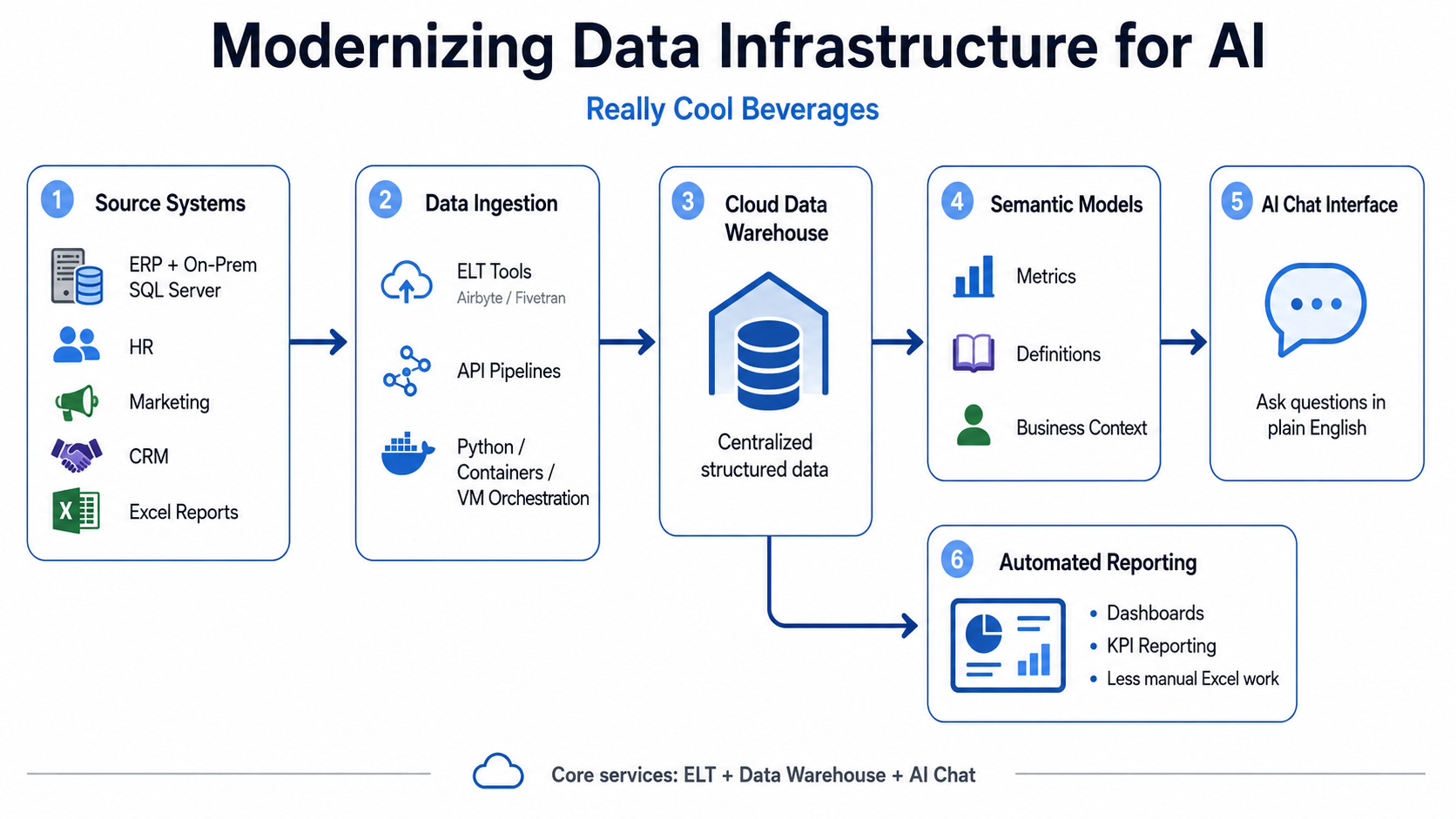
Really Cool Beverages has a pretty standard data systems setup: an ERP system writing to an on-premises sql server, while all of the other systems, like HR, marketing, and CRM are siloed. Analysts spend hours updating Excel spreadsheets due to not having an easy way to pull data.
The C-Suite is curious about integrating AI to increase productivity.
Current State Assessment
The first thing you need to do is assess the current state of data systems.
I mentioned earlier that the company has many data siloes. That can be addressed with a data warehouse, which will centralize all structured data sources. To address this, you will need a way to replicate this data from the source systems to the data warehouse. For APIs, you can use python to call them, then upload into the data warehouse with containers, or running on a VM with orchestration. For existing databases you have access to, it’s common to use ELT vendors like Airbyte (open source) or paid tools like FiveTran (paid).
After you have stood up the data warehouse, now we can use the data from the data warehouse to develop semantic models, which is basically just context about the data (this means data types, common metrics, etc). AI models can pick up the context from these semantic models, enabling you to chat with it. Then, you need to deploy an AI chat interface that integrates well with your data warehouse. Also, by having the data warehouse, you can automate a lot of the reporting functions mentioned earlier.
To recap, we need to deploy the following services: An ELT application, a data warehouse, and an AI chat provider.
Here is what that looks like in a simple diagram:
Snowflake Warehouse Deployment
For the warehouse layer, I am going to use Snowflake as the example.
There are other good data warehouse products, but Snowflake is the one I am most familiar with, so that is what I would reach for here. The general concepts still apply to other platforms: you need a central place to store replicated data, clean it, model it, secure it, and serve it to reporting or AI tools.
For Really Cool Beverages, Snowflake becomes the center of the data stack.
Airbyte moves data into Snowflake. Snowflake stores the raw data. Snowflake also gives us a place to transform that raw data into cleaner reporting objects. From there, BI tools and AI tools can connect to the cleaned data.
The first thing I would do is create a simple Snowflake structure. We need a warehouse, database, schemas, roles, and users.
For this example, I am going to call the database ERP because the first major source system is the ERP database.
CREATE WAREHOUSE ERP_PIPELINE_WH
    WAREHOUSE_SIZE = 'XSMALL'
    AUTO_SUSPEND = 60
    AUTO_RESUME = TRUE
    INITIALLY_SUSPENDED = TRUE;

CREATE DATABASE ERP;

CREATE SCHEMA ERP.IMPORT;
CREATE SCHEMA ERP.OUTPUT;
The warehouse is the compute layer. It is what Snowflake uses to run queries and load data.
The database is the main container for the ERP data.
The IMPORT schema is where Airbyte lands the replicated source data.
The OUTPUT schema is where cleaned views, tables, and reporting models live.
That separation is important. I would not have Airbyte loading directly into the final reporting layer. The replicated data should land first, mostly untouched. Then the cleaned business logic should be built on top of that.
For example, Airbyte might create tables like this:
ERP.IMPORT.CUSTOMERS
ERP.IMPORT.ORDERS
ERP.IMPORT.INVOICES
ERP.IMPORT.PAYMENTS
Then the data team can create cleaner objects like this:
ERP.OUTPUT.DIM_CUSTOMER
ERP.OUTPUT.DIM_PRODUCT
ERP.OUTPUT.FACT_ORDER
ERP.OUTPUT.FACT_INVOICE
The naming does not have to be exactly this, but the pattern is what matters. Raw replicated data should be separated from business-ready data.
Next, I would create a dedicated role for the pipeline service.
Airbyte should not use a personal admin account. It should use a service user with a specific role and only the permissions it needs.
A basic setup could look like this:
CREATE ROLE ERP_PIPELINE_ROLE;

CREATE USER AIRBYTE_SVC
    PASSWORD = 'use-a-secure-password-here'
    DEFAULT_ROLE = ERP_PIPELINE_ROLE
    DEFAULT_WAREHOUSE = ERP_PIPELINE_WH
    MUST_CHANGE_PASSWORD = FALSE;

GRANT ROLE ERP_PIPELINE_ROLE TO USER AIRBYTE_SVC;
In a real deployment, I would prefer key-pair authentication or another secure credential pattern instead of hardcoding a password. For a simple blog example, this shows the general shape of the setup.
Now the role needs access to use the warehouse, database, and import schema.
GRANT USAGE ON WAREHOUSE ERP_PIPELINE_WH TO ROLE ERP_PIPELINE_ROLE;

GRANT USAGE ON DATABASE ERP TO ROLE ERP_PIPELINE_ROLE;

GRANT USAGE ON SCHEMA ERP.IMPORT TO ROLE ERP_PIPELINE_ROLE;
GRANT CREATE TABLE ON SCHEMA ERP.IMPORT TO ROLE ERP_PIPELINE_ROLE;
GRANT CREATE VIEW ON SCHEMA ERP.IMPORT TO ROLE ERP_PIPELINE_ROLE;
GRANT CREATE STAGE ON SCHEMA ERP.IMPORT TO ROLE ERP_PIPELINE_ROLE;
Depending on how Airbyte is configured, it may need permission to create tables, write records, alter tables, and create temporary objects. The exact grant set can vary, but the idea is simple: give the pipeline role enough access to land data in the import schema, not full control over the entire Snowflake account.
I would also grant privileges on current and future tables in the import schema:
GRANT SELECT, INSERT, UPDATE, DELETE, TRUNCATE
ON ALL TABLES IN SCHEMA ERP.IMPORT
TO ROLE ERP_PIPELINE_ROLE;

GRANT SELECT, INSERT, UPDATE, DELETE, TRUNCATE
ON FUTURE TABLES IN SCHEMA ERP.IMPORT
TO ROLE ERP_PIPELINE_ROLE;
If Airbyte needs to alter replicated tables as schemas change, then it may also need additional privileges depending on the connector behavior. This is something to test during deployment. Source systems change, columns get added, and pipelines need to handle that without breaking every time.
Next, I would create a separate analytics role for reporting tools and analysts.
CREATE ROLE ERP_ANALYTICS_ROLE;

GRANT USAGE ON WAREHOUSE ERP_PIPELINE_WH TO ROLE ERP_ANALYTICS_ROLE;
GRANT USAGE ON DATABASE ERP TO ROLE ERP_ANALYTICS_ROLE;

GRANT USAGE ON SCHEMA ERP.OUTPUT TO ROLE ERP_ANALYTICS_ROLE;

GRANT SELECT ON ALL TABLES IN SCHEMA ERP.OUTPUT TO ROLE ERP_ANALYTICS_ROLE;
GRANT SELECT ON ALL VIEWS IN SCHEMA ERP.OUTPUT TO ROLE ERP_ANALYTICS_ROLE;

GRANT SELECT ON FUTURE TABLES IN SCHEMA ERP.OUTPUT TO ROLE ERP_ANALYTICS_ROLE;
GRANT SELECT ON FUTURE VIEWS IN SCHEMA ERP.OUTPUT TO ROLE ERP_ANALYTICS_ROLE;
This role would be used by Power BI, Tableau, Streamlit, or whatever reporting layer the company uses.
I would not point reporting tools directly at the import schema. The import schema is too close to the source system. It may have strange column names, inconsistent data types, deleted record flags, Airbyte metadata columns, and source-specific quirks.
The reporting layer should use the output schema.
For example, a cleaned customer dimension could look something like this:
CREATE OR REPLACE VIEW ERP.OUTPUT.DIM_CUSTOMER AS
SELECT
    CUSTOMER_ID,
    CUSTOMER_NAME,
    CUSTOMER_TYPE,
    SALES_REGION,
    CREATED_AT::DATE AS CREATED_DATE,
    IS_ACTIVE
FROM ERP.IMPORT.CUSTOMERS;
A simple order fact could look like this:
CREATE OR REPLACE VIEW ERP.OUTPUT.FACT_ORDER AS
SELECT
    ORDER_ID,
    CUSTOMER_ID,
    PRODUCT_ID,
    ORDER_DATE::DATE AS ORDER_DATE,
    QUANTITY,
    NET_SALES_AMOUNT,
    GROSS_MARGIN_AMOUNT
FROM ERP.IMPORT.ORDERS;
This is where the warehouse starts becoming useful. The data is no longer just copied from another system. It is shaped into something the business can actually use.
At this point, the company can start defining important metrics.
For example:
CREATE OR REPLACE VIEW ERP.OUTPUT.V_DAILY_SALES AS
SELECT
    ORDER_DATE,
    SUM(NET_SALES_AMOUNT) AS NET_SALES,
    SUM(GROSS_MARGIN_AMOUNT) AS GROSS_MARGIN,
    COUNT(DISTINCT ORDER_ID) AS ORDER_COUNT,
    COUNT(DISTINCT CUSTOMER_ID) AS CUSTOMER_COUNT
FROM ERP.OUTPUT.FACT_ORDER
GROUP BY ORDER_DATE;
This kind of view is simple, but it is useful. It gives the business a reusable definition of daily sales instead of forcing every analyst to write their own version of the logic.
That is one of the main reasons to use the warehouse.
Centralize the data. Centralize the logic. Centralize the definitions.
Then reporting and AI tools can consume the cleaned layer.
For the AI use case, this matters a lot. I would not want an AI tool querying random raw ERP tables unless there is a specific reason. It should query curated views with readable names and clear business definitions.
A model will do much better with a table called V_DAILY_SALES than with a messy source table called something like dbo_tbl_ord_hdr_archive.
Snowflake also gives you a clean security model. You can decide which roles can see which schemas, tables, or views. Finance data can be restricted. HR data can be restricted. Executives can get broader access. Analysts can get access to the domains they support.
Once AI enters the picture, this becomes even more important.
If an AI chat interface connects to Snowflake, it should not connect as an all-powerful admin user. It should connect through a role that only has access to approved reporting objects.
For example:
CREATE ROLE ERP_AI_ROLE;

GRANT USAGE ON WAREHOUSE ERP_PIPELINE_WH TO ROLE ERP_AI_ROLE;
GRANT USAGE ON DATABASE ERP TO ROLE ERP_AI_ROLE;
GRANT USAGE ON SCHEMA ERP.OUTPUT TO ROLE ERP_AI_ROLE;

GRANT SELECT ON ALL VIEWS IN SCHEMA ERP.OUTPUT TO ROLE ERP_AI_ROLE;
GRANT SELECT ON FUTURE VIEWS IN SCHEMA ERP.OUTPUT TO ROLE ERP_AI_ROLE;
This gives the AI layer access to the cleaned output views, not the entire warehouse.
That is the correct pattern.
The AI tool should be downstream of the governed data model. It should not be crawling through every replicated source table and inventing business logic.
For deployment, I would keep the first version practical:
Create the Snowflake warehouse.
Create the ERP database.
Create IMPORT and OUTPUT schemas.
Create a pipeline role for Airbyte.
Create an analytics role for dashboards.
Create an AI role for future AI tools.
Land source data in IMPORT.
Build cleaned views in OUTPUT.
Connect reporting and AI tools to OUTPUT.
This is enough to get started.
For Really Cool Beverages, this would already be a massive improvement. Instead of analysts pulling from the ERP manually, the data lands in Snowflake automatically. Instead of everyone defining metrics differently, the core logic starts living in reusable views. Instead of AI guessing against siloed systems, it can eventually query governed data with real business context.
That is the point of the Snowflake layer.
It turns scattered operational data into a usable company data foundation.
Airbyte Deployment
Now that we know the data needs to be centralized, the next step is getting it out of the existing systems and into Snowflake.
For Really Cool Beverages, the ERP system writes to an on-premises SQL Server database. This is a normal setup. A lot of companies have important business data sitting in databases that have been running for years. The issue is not the database itself. The issue is that analysts cannot easily use that data without manual exports, spreadsheet updates, and one-off reporting work.
This is where Airbyte comes in.
Airbyte is an ELT tool that moves data from source systems into a destination like Snowflake. You configure the source, configure the destination, choose the tables, and schedule the sync.
For this example, the flow is simple:
Existing SQL Server database → Airbyte → Snowflake
Airbyte can be deployed a few different ways. The simplest self-managed option is running it on a VM. In AWS, that usually means running it on an EC2 instance. You could also run it in ECS or EKS, but I would not start there unless the company already has a strong container infrastructure team.
For a first deployment, I would keep it boring:
Provision a Linux VM or EC2 instance.
Install Docker.
Deploy Airbyte.
Connect Airbyte to SQL Server.
Connect Airbyte to Snowflake.
Select the ERP tables.
Schedule the syncs.
The hardest part is usually not clicking through Airbyte. It is networking and permissions.
If SQL Server is on-prem, Airbyte needs a secure path to reach it. That could mean a VPN, firewall rule, private network connection, or allowlisted IP. You do not want to expose the production database to the public internet just because the company wants AI.
Airbyte also needs scoped credentials. The SQL Server user should be able to read the required tables. The Snowflake user should have access to the right warehouse, database, and schema, with permissions to create and write tables.
Once the connection works, you choose the first tables to replicate.
For Really Cool Beverages, that might be:
Customers
Products
Orders
Invoices
Payments
Inventory
Locations
Employees
The first sync will usually be a historical load. After that, larger tables should use incremental syncs when possible. Small reference tables can use full refresh. High-volume transactional tables may eventually need change data capture, but that does not need to be the first milestone.
In Snowflake, I would land the replicated data in an import schema first.
For example:
ERP.IMPORT.CUSTOMERS
ERP.IMPORT.ORDERS
ERP.IMPORT.INVOICES
ERP.IMPORT.PAYMENTS
This import layer should stay close to the source system. It is not the final reporting layer. After the data lands, you can build cleaner views or tables on top of it:
ERP.OUTPUT.DIM_CUSTOMER
ERP.OUTPUT.DIM_PRODUCT
ERP.OUTPUT.FACT_ORDER
ERP.OUTPUT.FACT_INVOICE
This keeps the responsibilities clean.
Airbyte moves the data.
Snowflake stores and transforms it.
Power BI, Tableau, Streamlit, or an AI chat interface consumes the cleaned layer.
That structure avoids scattering business logic across a bunch of different tools. If “net sales” or “active customer” is defined in five places, the company is going to have reporting problems no matter how good the tools are.
The Airbyte deployment should answer a few basic questions:
What source database are we pulling from?
What tables are being replicated?
How often should each table sync?
Should the sync be full refresh or incremental?
Where should the data land in Snowflake?
What role owns the Snowflake objects?
Who gets alerted when something fails?
That last point is important. A pipeline should not silently fail for three days while everyone keeps looking at stale dashboards. At minimum, the team needs Airbyte failure alerts and a simple Snowflake freshness check showing when key tables were last updated.
For Really Cool Beverages, nightly syncs would be a strong starting point. That alone would remove a lot of manual Excel work. Instead of analysts exporting ERP data every morning, the core tables would already be in Snowflake and ready for reporting.
Once that foundation is stable, the company can build the next layers: cleaned models, dashboards, semantic definitions, and eventually AI chat.
Airbyte is not the exciting part of the architecture. It is the pipe. But the pipe matters because everything downstream depends on the data showing up reliably.
API Deployments
Airbyte is a good fit when there is already a connector for the system you need to replicate. But not every source system is that clean.
Sometimes the data you need is behind an API.
That could be a CRM API, marketing platform API, HR system API, property management API, social media API, or some internal application endpoint. In those cases, you may need to build the pipeline yourself.
This is where Python becomes useful.
For Really Cool Beverages, let’s say the company has a marketing platform that exposes campaign, lead, and engagement data through an API. There may not be a perfect Airbyte connector for it, or maybe the connector exists but does not pull the exact fields the business needs.
In that case, I would create a small Python pipeline.
The flow would look like this:
API Source → Python Extract Script → Container / VM Scheduler → Snowflake IMPORT → Snowflake OUTPUT
The idea is simple.
Python calls the API, gets the data, normalizes it into a usable structure, and loads it into Snowflake. Then Snowflake handles the cleaning and modeling just like it does with the ERP data.
I would keep the code structure boring and predictable.
Something like this:
api_pipeline/
    app/
        main.py
        config.py
        clients/
            marketing_api.py
        loaders/
            snowflake_loader.py
        transforms/
            normalize_campaigns.py
            normalize_leads.py
        utils/
            logging.py
    Dockerfile
    requirements.txt
    .env
The exact folder names are not the point. The point is that the pipeline should be easy to understand.
The API client should handle API calls.
The loader should handle Snowflake writes.
The transform files should handle basic formatting.
The main file should orchestrate the process.
A simple main.py might look like this:
from app.clients.marketing_api import MarketingApiClient
from app.transforms.normalize_campaigns import normalize_campaigns
from app.loaders.snowflake_loader import SnowflakeLoader


def run():
    client = MarketingApiClient()
    loader = SnowflakeLoader()

    raw_campaigns = client.get_campaigns()
    campaigns = normalize_campaigns(raw_campaigns)

    loader.load_json_rows(
        rows=campaigns,
        database="ERP",
        schema="IMPORT",
        table="MARKETING_CAMPAIGNS"
    )


if __name__ == "__main__":
    run()
This does not need to be fancy.
The pipeline should do a few things well:
Call the API.
Handle pagination.
Handle authentication.
Handle retries.
Log what happened.
Load the data into Snowflake.
Fail loudly if something breaks.
The API client might look something like this:
import os
import time
import requests


class MarketingApiClient:
    def __init__(self):
        self.base_url = os.environ["MARKETING_API_BASE_URL"]
        self.api_key = os.environ["MARKETING_API_KEY"]

    def get_campaigns(self):
        campaigns = []
        page = 1

        while True:
            response = requests.get(
                f"{self.base_url}/campaigns",
                headers={"Authorization": f"Bearer {self.api_key}"},
                params={"page": page, "limit": 500},
                timeout=30
            )

            if response.status_code == 429:
                time.sleep(30)
                continue

            response.raise_for_status()

            data = response.json()
            records = data.get("records", [])

            if not records:
                break

            campaigns.extend(records)

            if not data.get("has_more"):
                break

            page += 1

        return campaigns
Most API pipelines are not intellectually complicated. They are just annoying.
You have to deal with pagination. You have to deal with rate limits. You have to deal with tokens expiring. You have to deal with fields being missing. You have to deal with APIs returning weird nested JSON.
That is why the pipeline should stay small and readable.
After the API data is pulled, I would normalize it into a flat structure before loading it into Snowflake.
For example:
def normalize_campaigns(records):
    normalized = []

    for record in records:
        normalized.append({
            "campaign_id": record.get("id"),
            "campaign_name": record.get("name"),
            "status": record.get("status"),
            "created_at": record.get("created_at"),
            "updated_at": record.get("updated_at"),
            "source_loaded_at": record.get("loaded_at")
        })

    return normalized
Then the Snowflake loader handles the database side.
For a simple first version, the loader can write rows into a staging table or directly into an import table. For larger pipelines, I would usually stage files first, then copy into Snowflake.
A simple loader might look like this:
import os
import snowflake.connector


class SnowflakeLoader:
    def __init__(self):
        self.conn = snowflake.connector.connect(
            user=os.environ["SNOWFLAKE_USER"],
            password=os.environ["SNOWFLAKE_PASSWORD"],
            account=os.environ["SNOWFLAKE_ACCOUNT"],
            warehouse=os.environ["SNOWFLAKE_WAREHOUSE"],
            database=os.environ["SNOWFLAKE_DATABASE"],
            schema=os.environ["SNOWFLAKE_SCHEMA"],
            role=os.environ["SNOWFLAKE_ROLE"]
        )

    def load_json_rows(self, rows, database, schema, table):
        if not rows:
            print("No rows returned from API.")
            return

        cursor = self.conn.cursor()

        cursor.execute(f"""
            CREATE TABLE IF NOT EXISTS {database}.{schema}.{table} (
                RAW_RECORD VARIANT,
                LOADED_AT TIMESTAMP_NTZ DEFAULT CURRENT_TIMESTAMP()
            )
        """)

        insert_sql = f"""
            INSERT INTO {database}.{schema}.{table} (RAW_RECORD)
            SELECT PARSE_JSON(%s)
        """

        import json
        cursor.executemany(
            insert_sql,
            [(json.dumps(row),) for row in rows]
        )

        cursor.close()
For a blog example, this is enough to show the concept. In production, I would make this more robust. I would add better logging, better error handling, batch loading, environment-specific configs, and probably file staging for larger datasets.
The Snowflake side should follow the same pattern as the Airbyte data.
API data lands in ERP.IMPORT.
Cleaned objects live in ERP.OUTPUT.
For example:
ERP.IMPORT.MARKETING_CAMPAIGNS
ERP.IMPORT.MARKETING_LEADS
ERP.IMPORT.MARKETING_ENGAGEMENTS
Then the cleaned layer could look like this:
ERP.OUTPUT.DIM_CAMPAIGN
ERP.OUTPUT.DIM_LEAD
ERP.OUTPUT.FACT_MARKETING_ENGAGEMENT
A cleaned view could be very simple:
CREATE OR REPLACE VIEW ERP.OUTPUT.DIM_CAMPAIGN AS
SELECT
    RAW_RECORD:campaign_id::STRING AS CAMPAIGN_ID,
    RAW_RECORD:campaign_name::STRING AS CAMPAIGN_NAME,
    RAW_RECORD:status::STRING AS STATUS,
    RAW_RECORD:created_at::TIMESTAMP_NTZ AS CREATED_AT,
    RAW_RECORD:updated_at::TIMESTAMP_NTZ AS UPDATED_AT,
    LOADED_AT
FROM ERP.IMPORT.MARKETING_CAMPAIGNS;
This is why landing API responses as VARIANT can be useful at first. You can store the raw JSON and then extract fields in Snowflake views. That gives you flexibility while the pipeline is still changing.
Once the API structure is stable, you can move toward typed tables instead of storing everything as raw JSON.
For deployment, I would containerize the pipeline.
The Dockerfile can be simple:
FROM python:3.11-slim

WORKDIR /app

COPY requirements.txt .

RUN pip install --no-cache-dir -r requirements.txt

COPY . .

CMD ["python", "-m", "app.main"]
And the requirements.txt might look like this:
requests
snowflake-connector-python
python-dotenv
Now the pipeline can run anywhere that supports containers.
That could be:
A Linux VM.
An AWS EC2 instance.
AWS ECS.
AWS Batch.
A scheduled GitHub Actions job.
A Kubernetes cluster.
For a first version, I would not overthink it. If the company already has a VM, run the container there with a scheduler. If the company is already using AWS, ECS or Batch can be a clean next step.
A simple VM deployment could use cron:
0 2 * * * docker run --env-file /opt/api_pipeline/.env api-pipeline:latest
That would run the pipeline every night at 2 AM.
For AWS, the cleaner version would be:
Build the Docker image.
Push it to Amazon ECR.
Run it as an ECS task.
Schedule the ECS task with EventBridge.
Store secrets in AWS Secrets Manager or Parameter Store.
The structure would look like this:
EventBridge Schedule → ECS Task → Python Container → API → Snowflake
That is a solid deployment pattern.
It is not overbuilt, but it is also not someone running a script from their laptop. That distinction matters.
A laptop script is not a pipeline.
A scheduled container with logging, secrets, and failure alerts is a pipeline.
For permissions, the Python pipeline should use its own Snowflake role, just like Airbyte does.
For example:
CREATE ROLE ERP_API_PIPELINE_ROLE;

CREATE USER API_PIPELINE_SVC
    PASSWORD = 'use-a-secure-password-here'
    DEFAULT_ROLE = ERP_API_PIPELINE_ROLE
    DEFAULT_WAREHOUSE = ERP_PIPELINE_WH
    MUST_CHANGE_PASSWORD = FALSE;

GRANT ROLE ERP_API_PIPELINE_ROLE TO USER API_PIPELINE_SVC;

GRANT USAGE ON WAREHOUSE ERP_PIPELINE_WH TO ROLE ERP_API_PIPELINE_ROLE;
GRANT USAGE ON DATABASE ERP TO ROLE ERP_API_PIPELINE_ROLE;
GRANT USAGE ON SCHEMA ERP.IMPORT TO ROLE ERP_API_PIPELINE_ROLE;

GRANT CREATE TABLE ON SCHEMA ERP.IMPORT TO ROLE ERP_API_PIPELINE_ROLE;
GRANT CREATE STAGE ON SCHEMA ERP.IMPORT TO ROLE ERP_API_PIPELINE_ROLE;

GRANT SELECT, INSERT, UPDATE, DELETE, TRUNCATE
ON ALL TABLES IN SCHEMA ERP.IMPORT
TO ROLE ERP_API_PIPELINE_ROLE;

GRANT SELECT, INSERT, UPDATE, DELETE, TRUNCATE
ON FUTURE TABLES IN SCHEMA ERP.IMPORT
TO ROLE ERP_API_PIPELINE_ROLE;
The API pipeline should only be able to write where it needs to write. It does not need admin access. It does not need ownership of the whole database. It does not need access to every schema.
Keep the service role scoped.
For monitoring, I would add a simple load audit table in Snowflake.
CREATE TABLE IF NOT EXISTS ERP.IMPORT.PIPELINE_LOAD_AUDIT (
    PIPELINE_NAME STRING,
    SOURCE_NAME STRING,
    TARGET_TABLE STRING,
    STARTED_AT TIMESTAMP_NTZ,
    FINISHED_AT TIMESTAMP_NTZ,
    STATUS STRING,
    ROW_COUNT NUMBER,
    ERROR_MESSAGE STRING
);
Every pipeline run should write to this table.
That makes it much easier to answer basic questions:
Did the job run?
Did it fail?
How many rows loaded?
When was the table last updated?
What error happened?
You do not need an elaborate monitoring system on day one, but you do need visibility. Silent failures are how dashboards become untrustworthy.
For Really Cool Beverages, this API deployment pattern gives the company flexibility. Airbyte can handle the standard database replication. Python containers can handle APIs that are more custom or business-specific. Both land data in Snowflake. Snowflake becomes the common layer.
AI-Readiness
At this point, let’s assume the data plumbing is working.
Airbyte is replicating the ERP database into Snowflake. Python containers are pulling API data into Snowflake. Raw data is landing in ERP.IMPORT, and cleaned reporting objects are being created in ERP.OUTPUT.
Now the company can start thinking about AI.
The mistake would be jumping straight to a chatbot. The chatbot is just the interface. The important part is the semantic layer underneath it.
A semantic model gives business meaning to the data. It explains what tables, columns, joins, and metrics actually mean.
For example, the database may have fields like this:
CUST_ID
ORD_DT
NET_AMT
SKU_NUM
A semantic model translates that into business language:
CUST_ID = Customer ID
ORD_DT = Order Date
NET_AMT = Net Sales Amount
SKU_NUM = Product SKU
Then it defines metrics:
Net Sales = SUM(NET_SALES_AMOUNT)

Gross Margin = SUM(GROSS_MARGIN_AMOUNT)

Gross Margin % = Gross Margin / Net Sales

Active Customers = customers with at least one order in the last 12 months
This matters because AI needs context. If the model does not know what “net sales” means, it will either guess or generate inconsistent logic.
For Really Cool Beverages, I would start with a small AI-ready layer in Snowflake:
ERP.OUTPUT.DIM_CUSTOMER
ERP.OUTPUT.DIM_PRODUCT
ERP.OUTPUT.DIM_DATE
ERP.OUTPUT.FACT_ORDER
ERP.OUTPUT.FACT_INVOICE
ERP.OUTPUT.V_DAILY_SALES
ERP.OUTPUT.V_SALES_BY_REGION
Then I would define the key metrics, joins, synonyms, and descriptions around those objects.
This is where a tool like Glean becomes useful.
Glean can be the user-facing AI interface. A user asks a business question in plain English, Glean passes the question into Snowflake Cortex, Cortex uses the semantic model to understand the business context, and Snowflake executes the query against governed data.
The flow looks like this:
User question in Glean
→ Snowflake Cortex
→ Semantic model
→ ERP.OUTPUT views
→ Answer returned to the user
For example, an executive could ask:
What were net sales by region last quarter?The user should not need to know SQL, table names, joins, or date logic. The semantic layer should already know that “net sales” maps to the approved sales metric and “region” maps to the sales region field.
That means the AI role in Snowflake should be restricted:
CREATE ROLE ERP_AI_ROLE;

GRANT USAGE ON WAREHOUSE ERP_PIPELINE_WH TO ROLE ERP_AI_ROLE;
GRANT USAGE ON DATABASE ERP TO ROLE ERP_AI_ROLE;
GRANT USAGE ON SCHEMA ERP.OUTPUT TO ROLE ERP_AI_ROLE;

GRANT SELECT ON ALL VIEWS IN SCHEMA ERP.OUTPUT TO ROLE ERP_AI_ROLE;
GRANT SELECT ON FUTURE VIEWS IN SCHEMA ERP.OUTPUT TO ROLE ERP_AI_ROLE;
The AI tool does not need admin access. It does not need every raw table. It needs access to the approved reporting layer.
A practical AI-readiness checklist would be:
1. Data lands reliably in Snowflake.
2. Raw data is separated from cleaned data.
3. Core reporting views exist in ERP.OUTPUT.
4. Metrics are clearly defined.
5. Joins and relationships are documented.
6. Business synonyms are added.
7. AI access uses a restricted Snowflake role.
8. Common questions are tested against trusted reports.
That last step is important. Do not assume the AI works because the first demo looks good. Test it against known answers.
Ask questions like:
What were net sales last month?
What were the top products by gross margin?
How many active customers do we have?
What region had the highest order count?
Then compare the AI responses to trusted reports.
If the answers are wrong, the fix is usually not “get a smarter chatbot.” The fix is usually better data modeling, cleaner definitions, or a stronger semantic layer.
That is the real AI-readiness work.
The goal is not just to add AI. The goal is to let business users ask normal questions and get trusted answers from Snowflake without needing to know SQL.
Cost Considerations
The nice thing about this architecture is that it is not insanely expensive to start.
The main costs are:
1. Airbyte / ELT infrastructure
2. Python container infrastructure
3. Snowflake compute and storage
4. Glean licensing and AI usage
5. Engineering time to build and maintain it
For Airbyte, the cost depends on how you deploy it.
If you self-host Airbyte on an existing VM, the software itself can be free. The cost is really the server, storage, monitoring, and the time it takes to maintain it.
If you run Airbyte in AWS, then you are paying for the underlying compute. For example, if Airbyte is running on ECS from 8 AM to 5 PM during business days, then you are only paying for the time those containers are running. That is a good pattern because there is usually no reason to run replication infrastructure 24/7 for a small company unless the business actually needs near real-time data.
For Really Cool Beverages, I would probably start with business-hours or nightly syncs.
Something like this:
Airbyte schedule: 8 AM - 5 PM, Monday - Friday
Use case: ERP replication into Snowflake
Deployment: VM, EC2, or ECS
Estimated monthly infrastructure: $0 incremental if using an existing VM, or a few hundred dollars if running dedicated cloud infrastructure
For the custom API pipelines, we already have a similar container pattern. Assume the Python containers cost around $500 per month. That is not crazy if those containers are pulling from multiple APIs, loading Snowflake, logging runs, and supporting multiple business processes.
The important thing is to avoid turning every API into its own expensive snowflake of infrastructure.
I would rather have a standard pattern:
Python container
Environment variables / secrets
API client
Snowflake loader
Audit table
Scheduled run
Failure alert
Then reuse that pattern across CRM, marketing, HR, and other APIs.
Snowflake is usually the easiest cost to reason about if you keep the warehouse small.
For this company, I would start with an XS warehouse.
An XS Snowflake warehouse uses 1 credit per hour. If the credit price is around $2, then the warehouse costs about $2 per hour while it is running.
If the warehouse runs 8 AM to 5 PM on business days, the rough math is:
9 hours per day
x 22 business days
= 198 hours per month

198 hours
x 1 credit per hour
= 198 credits

198 credits
x $2 per credit
= about $396 per month
That is not bad for a company-wide data warehouse.
Also, Snowflake warehouses can auto-suspend. That matters. If nobody is querying and no pipeline is loading data, the warehouse should shut itself off. Do not leave warehouses running for no reason.
A simple setup would be:
CREATE WAREHOUSE ERP_PIPELINE_WH
    WAREHOUSE_SIZE = 'XSMALL'
    AUTO_SUSPEND = 60
    AUTO_RESUME = TRUE
    INITIALLY_SUSPENDED = TRUE;
Storage will be another cost, but for a small or mid-sized company this is usually not the scary part at first. Compute is where people usually waste money.
The Glean cost is different.
Glean is more of a licensing and usage cost than an infrastructure cost. You should expect a per-user licensing model, and depending on the contract, additional usage-based AI costs may apply. In Glean’s newer pricing model, there is a base per-user license plus pooled usage credits for more advanced AI features.
So I would think about Glean in two buckets:
Fixed cost: user licenses

Variable cost: heavier AI usage, advanced queries, agent runs, premium models, or overage credits
For example:
100 users x estimated $50/user/month = about $5,000/month
Then add any variable AI usage or premium model usage on top.
That number is just a planning estimate. Glean pricing is quote-based, so the real number depends on the contract, user count, deployment model, included credits, and usage.
A simple monthly estimate for Really Cool Beverages could look like this:
Airbyte infrastructure:        $0 - $500/month
Python API containers:         ~$500/month
Snowflake XS warehouse:        ~$400/month if running business hours
Snowflake storage:             depends on data volume, likely minimal at first
Glean licensing:               quote-based, potentially several thousand/month
Glean AI usage / credits:      fixed allowance + possible variable overage
Engineering maintenance:       not optional
So a practical starting range could be:
Without Glean:
~$900 - $1,500/month for the core data infrastructure

With Glean:
Add licensing and AI usage, likely making it several thousand dollars per month depending on seats
The data infrastructure itself is not the expensive part if you keep it simple. An XS Snowflake warehouse, a few containers, and a self-hosted Airbyte deployment are very manageable.
The bigger cost is usually the enterprise AI layer and the people maintaining the system.
That is why I would not start by rolling AI out to the entire company.
I would start with a narrow group:
Finance
Operations
Sales leadership
Data team
Then measure whether the AI answers are actually useful.
If the system saves analysts from manual reporting, helps executives self-serve basic questions, and reduces spreadsheet chaos, then the cost is easier to justify.
If it just becomes another shiny chatbot nobody trusts, then it is expensive theater.
The goal is not to buy AI.
The goal is to build a data foundation where AI can actually be useful.
Implementation Roadmap
At this point, the architecture is clear. The company needs source system replication, a warehouse, cleaned reporting models, semantic definitions, and an AI interface.
The order matters.
I would not start with the chatbot. That is how you end up with AI sitting on top of messy data and giving inconsistent answers.
For Really Cool Beverages, I would sequence the project like this:
1. Create the Snowflake warehouse, database, schemas, and roles.
2. Deploy Airbyte for ERP database replication.
3. Deploy Python containers for API-based systems.
4. Land raw data in ERP.IMPORT.
5. Build cleaned tables and views in ERP.OUTPUT.
6. Connect BI tools to the cleaned output layer.
7. Define semantic models around core business metrics.
8. Connect Glean and Snowflake Cortex to the semantic layer.
9. Test AI answers against trusted reports.
10. Expand to more business domains after the first version works.
The first milestone is not “we have AI.”
The first milestone is “the data lands reliably.”
The second milestone is “the cleaned reporting layer is trusted.”
After that, AI becomes much more useful.
I would start with one domain, probably sales. Replicate customers, products, orders, invoices, and payments. Build simple views for daily sales, sales by region, sales by product, and customer activity. Then define terms like net sales, gross margin, active customer, region, and order count.
Once that works, expand the pattern.
Common Failure Points
These projects usually fail in predictable ways.
The most common mistake is trying to add AI before fixing the data foundation. If the source systems are messy, the definitions are unclear, and the reporting logic lives in random spreadsheets, AI will not magically solve that. It will just make the confusion faster.
Other common failure points:
Bad Snowflake permissions
No clear source system ownership
Airbyte syncs failing silently
API pipelines running from someone’s laptop
Raw tables being used directly for reporting
No distinction between IMPORT and OUTPUT schemas
Business metrics defined differently across teams
AI connected to too many messy tables
No testing against trusted reports
No one owning the semantic layer
The semantic layer is especially easy to underestimate.
Someone has to define what the business actually means by revenue, customer, active customer, margin, region, order, churn, and pipeline. If no one owns those definitions, the AI layer will be weak.
Most AI data problems are not really AI problems.
They are modeling problems, permissions problems, pipeline problems, or business definition problems.
What Success Looks Like
A successful version of this project is not flashy.
It is mostly boring infrastructure working correctly.
Data lands in Snowflake on schedule. Airbyte syncs the ERP data. Python containers pull the API data. The import layer stores the raw data. The output layer contains clean reporting views. Dashboards refresh without analysts manually exporting files.
That alone is a major win.
Success looks like this:
Analysts stop manually updating the same spreadsheets.
Dashboards refresh from Snowflake.
ERP and API data live in one centralized place.
Core metrics have approved definitions.
Executives can self-serve basic questions.
AI answers are tested against known reports.
The data team spends more time modeling and less time exporting.
The AI layer should make the system easier to use, not replace the system underneath it.
If someone asks Glean, “What were net sales by region last quarter?” the answer should come from governed Snowflake data, approved semantic definitions, and tested business logic.
That is the standard.
Not a cool demo.
A trusted answer.
Conclusion
It is very tempting to start with the AI tool because that is the thing people can see and get excited about. A chatbot demo is a lot more interesting than talking about schemas, permissions, sync schedules, semantic models, and data freshness. But after you actually work through these kinds of deployments, the lesson becomes pretty obvious: the boring infrastructure is what makes the impressive stuff possible.
If the company still has siloed systems, fragile pipelines, unclear metric definitions, and analysts manually updating spreadsheets every week, AI is not going to magically fix that. It will just sit on top of the mess. It might sound confident, but the answers will only be as good as the data foundation underneath it.
The practical path is to get the data moving first, land it in Snowflake, separate raw data from cleaned reporting objects, define the important business metrics, and then connect BI and AI tools to that governed layer. Once that is in place, AI starts to become genuinely useful. Not because it is magic, but because it finally has clean data and business context to work with.
For Really Cool Beverages, the goal is not to buy a chatbot and call the project done. The goal is to build the foundation that makes automated reporting, better analytics, semantic models, and AI possible in the first place. Infrastructure first, AI second.
To summarize the architecture:
- Airbyte for database replication
- Python containers for APIs
- Snowflake for centralized storage and modeling
- OUTPUT schema for governed reporting objects
- Semantic models for business meaning
- Glean/Cortex for natural language access
If you have questions about this kind of setup, or need help thinking through Airbyte, Snowflake, API pipelines, semantic models, or AI-readiness, feel free to contact me at: jordan@jordangoodman.xyz.
Thanks for reading!